Every repo you work on, in one file.
Describe your projects once (where they live, their remotes, and who you commit as) and manage them all from the terminal. Keep the file in your vault. When you get a new machine, one command brings back every repo.
curl -fsSL https://raw.githubusercontent.com/milyzc/git-projects-manager/main/install.sh | bash
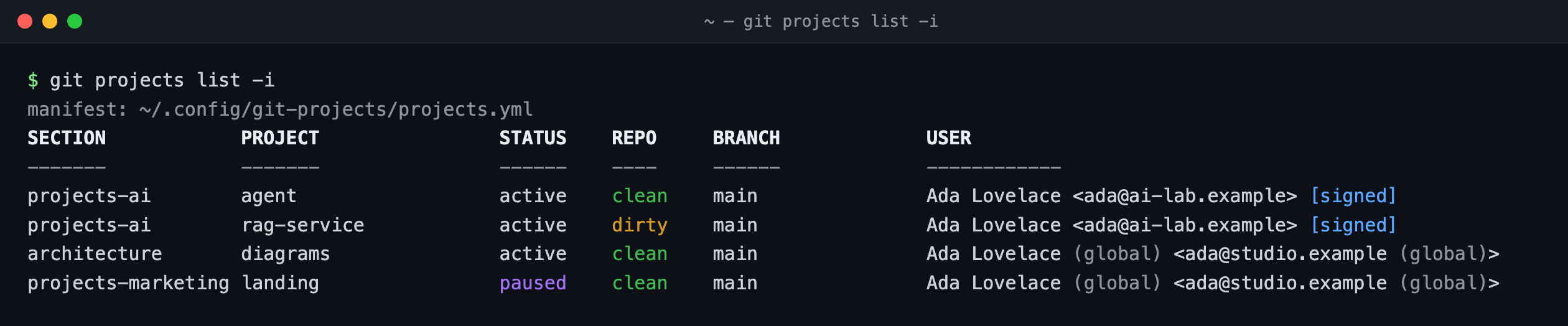
One table for all your projects: git projects list -i shows the state of each repo and which identity it commits with.
One manifest, every project
Group your repos in sections and set defaults once per section. The file has no secrets, only paths, public URLs, names and emails, so it is safe to sync, version or put in a vault.
projects-ai:
  defaults:              # inherited by the section
    user:
      name: Ada Lovelace
      email: ada@ai-lab.example
      signingkey: ~/.ssh/ai_signing.pub
      sign: true
  agent:
    path: ~/projects-ai/agent
    remote: git@github.com:ada-lab/agent.git
  rag-service:
    path: ~/projects-ai/rag-service
    remote:
      origin: git@github.com:ada/rag-service.git
      upstream: git@github.com:ada-lab/rag-service.git
    submodules: true
projects-marketing:
  landing:
    path: ~/projects-marketing/landing
    remote: git@github.com:ada-studio/landing.git
    status: paused
- Sections group repos by client, team or area. Each section can set defaults that its projects inherit.
- Several remotes per repo (
origin,upstream…), plus branch and submodules. - Identity per project:
user.name,user.emailand SSH, GPG or x509 signing, written to each repo and its submodules. - Status:
active,pausedorarchived. Old projects stay on record without cluttering daily work.
What you can do with it
A handful of commands and flags. list, clone and paths take --section and --status filters.
git projects
A table of every repo: missing, clean or dirty, branch, ahead/behind. Add -i to see who each repo commits as, and spot the ones using the wrong email.
git projects clone
Clones what is missing. On repos that already exist it only adds missing remotes, submodules and identity. Run it as often as you like.
clone --dry-run
Shows what would be cloned or configured, without changing anything.
clone --protocol https
No SSH key on this machine yet? Rewrites git@ URLs to https on the fly, without editing the file.
clone --adopt
Turns a folder that already has the code but no .git (from a backup, say) into a repo connected to its remotes, keeping every local file.
git projects check
Validates the manifest (duplicate paths, bad fields, private keys used as signing keys) and reports drift between the file and the disk.
git projects paths
One path per line, for scripts: for d in $(git projects paths); do git -C "$d" fetch; done
Submodule identity
An includeIf gives current and future submodules (and worktrees) the right identity, so nothing commits as you@hostname.local.
A new machine in four commands
A new laptop, a reinstall, a broken one: restore the file and let the tool do the rest.
- Install: the one-liner above. It only needs
gitandpython3. - Restore the manifest from 1Password, Bitwarden, an
agefile or a private dotfiles repo (recipes). git projects checkto validate it.git projects clone: every repo comes back with its remotes, submodules and identity.
# example with 1Password
op document get projects.yml --out-file ~/.config/git-projects/projects.yml
git projects check
git projects clone
Safe to run anywhere
- Existing repos are never overwritten. If a value differs from the manifest, the tool warns instead of changing it.
- Credentials are refused: URLs with a user, token or password are an error and are printed masked.
- Git never prompts. Auth goes through your credential helper or SSH agent.
- One bash script with embedded Python (standard library only). Tested on Linux and macOS in CI.